Editable Travel Planner KDP Interior: A Practical Tool for Creators, Entrepreneurs, and Everyday Organizers
If you have ever tried to plan a trip using nothing but sticky notes, scattered browser tabs, and a half-filled notes app, you already know how quickly things get messy. Flight confirmations disappear into email threads. Hotel addresses get typed into the wrong folder. And somewhere between booking a rental car and figuring out dinner reservations, the entire trip starts feeling more stressful than it should. That is exactly where a good travel planner steps in. And when that planner comes in the form of an Editable Travel Planner KDP Interior, it becomes something much more useful than just a notebook. It becomes a system that works the way you do.
What Makes This Travel Planner Different from a Standard Notebook
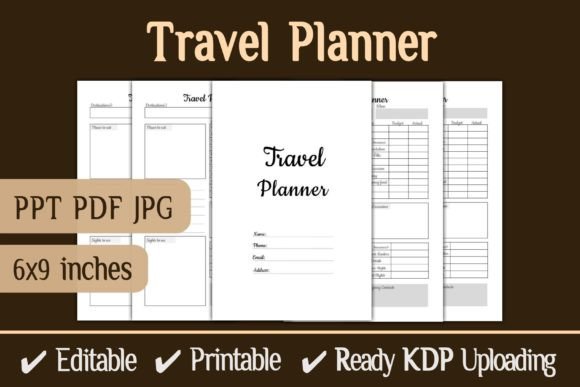
A standard notebook gives you blank pages and hopes for the best. This Travel Planner KDP Interior Download gives you structure. It comes as a complete interior file designed specifically for Amazon KDP, but it also works beautifully for personal use. The package includes a fully editable PowerPoint file, a PDF ready to print or upload, and JPG versions of every page. The dimensions sit at 6 by 9 inches, 120 pages, with no bleed. That means you can print it at home, take it to a local print shop, or upload it directly to KDP without worrying about trimming or formatting issues.
What makes it genuinely valuable, though, is the editing capability. You can change fonts, move elements, swap colors, add your own branding, or rewrite sections entirely. That flexibility turns a simple planner into something that fits your exact workflow, whether you are a frequent traveler, a content creator selling planners online, or a small business owner looking for a product to launch on Amazon.
For the Solo Traveler Who Wants to Stay Organized Without Overthinking
Imagine you are planning a two-week trip across Japan. You have flights to track, train passes to figure out, hostel bookings, temple visits, and about forty restaurant recommendations from three different friends. You could dump all of that into a spreadsheet, but spreadsheets feel like work. You could use a travel app, but apps change their interfaces every six months and sometimes disappear entirely. What you really want is something tangible that you can flip through on the plane, something that does not require wifi, and something that looks pleasant enough to actually enjoy using.
This Editable Travel Planner KDP Interior gives you exactly that. You can customize the sections before you print, add your own categories, remove anything you do not need, and end up with a planner that feels like it was made for your specific itinerary. The 120 pages give you plenty of room for daily logs, packing lists, budgeting pages, and notes. And because it is a PDF ready to print, you can make multiple copies. One for your bag, one for your partner, and one to leave behind with your emergency contact.
For the KDP Publisher Building a Catalog of Travel Planners
If you sell on Amazon KDP, you already know that the travel niche is crowded. What sets successful listings apart is interior quality and uniqueness. A generic planner with basic tables and no design thought rarely holds up against competitors. The Travel Planner KDP Interior Download changes that because it gives you a professional layout that you can edit and brand as your own. You are not stuck with someone else's logo or color scheme. You can adjust the entire look to match your brand, add your own cover design, and publish something that feels cohesive.
The fact that the file comes with no bleed and fits the standard 6 by 9 inch trim size means you do not have to fiddle with margins or worry about content getting cut off during printing. That alone saves hours of formatting time. And because you get both the editable PPT and the print-ready PDF, you have the freedom to make updates later if you want to release a second edition or create variations for different types of travel, like road trips, international backpacking, or family vacations.
For Freelancers and Educators Who Need Custom Planners for Clients or Students
Not everyone who buys a travel planner wants to publish it. Some people want to use it as a teaching tool or a client resource. If you are a travel consultant, you might give customized planners to your clients so they stay organized before their trip. If you teach a class on travel planning or life skills, you might want a printed workbook that students can fill out by hand.
Because the file is fully editable in PowerPoint, you can strip out sections that do not apply, add your own content, and print as many copies as you need. You can also brand it with your business logo, include your contact information, and hand it out as a value-added resource that sets you apart from competitors. That kind of practical touch builds trust and shows clients or students that you care about their experience, not just their payment.
What to Consider Before Downloading and Using This Interior
Before you jump into editing and publishing, there are a few things worth thinking about. First, consider your audience. If you are publishing on KDP, think about what kind of traveler would buy your planner. Is it someone planning a luxury vacation? A budget backpacker? A family with young kids? The interior is versatile, but your customization choices, like the font style, color palette, and section headings, should match the expectations of your target reader.
Second, think about how you want to present the planner. The 6 by 9 inch size is popular for paperbacks because it feels comfortable in hand and fits easily into a bag. But if you plan to sell on a platform other than Amazon, like Etsy or Gumroad, you might want to offer multiple file formats. The bundle you get includes PPT, PDF, and JPG files, which gives you flexibility for different sales channels.
Third, pay attention to the editing process itself. PowerPoint is accessible and easy to use, but if you plan to make significant layout changes, give yourself time to test how those changes look when exported to PDF. A small shift in a text box might look fine on your screen but could throw off the alignment when printed. Always do a test print of a few pages before you upload the final version to KDP or send it to a printer.
Practical Ways to Use This Planner Beyond Standard Travel Planning
Travel planners are not just for trips. Many people use them for other kinds of planning that involve moving from one place to another or managing multiple logistics. Here are a few realistic scenarios where this interior file proves useful beyond the obvious.
Relocation and Moving Planning
Moving to a new city or country involves just as much logistics as a complex trip. You have to track moving dates, utility setup appointments, important documents, and addresses. The same sections that work for a travel itinerary, like daily schedules, checklists, and notes, work perfectly for a move. Just edit the headings and repurpose the pages.
Event and Conference Attendance
If you attend a multi-day conference, trade show, or festival, having a planner dedicated to that event helps you keep track of sessions, speaker notes, networking contacts, and meal breaks. The 120-page count gives you room to document each day in detail without feeling cramped.
Digital Product Creation and Bundling
If you sell digital products on Etsy or your own website, you can bundle this travel planner with other organizational printables. Because it is editable, you can adapt the design to match the aesthetic of your shop, whether that is minimalistic, colorful, or vintage. Offering a bundle of planners, like a travel planner plus a daily planner and a budget tracker, increases the perceived value and encourages larger purchases.
Connecting Features to Real Outcomes
Let's look at a few specific features of this Editable Travel Planner KDP Interior and what they actually mean for you as a user or publisher.
- 120 pages with no bleed: You get substantial content without worrying about printing errors. That means fewer returns and happier customers if you publish on KDP.
- Editable PowerPoint file: You do not need expensive design software or specialized skills. Anyone who can use basic PowerPoint functions can customize this planner.
- PDF ready to upload: The PDF is formatted for KDP specifications. You can upload it in minutes, not hours, which speeds up your publishing timeline significantly.
- JPG files included: If you want to show preview images in your product listing or on social media, the JPG files make it easy to create mockups without opening the editing software.
- Unique interior design: The layout is not a generic table dump. It has intentional spacing, clear sections, and visual appeal that makes people want to use it, not just store it on a shelf.
Who Benefits Most from This Product
While the planner is useful for anyone who travels or wants to sell travel planners, certain groups get the most value from it. KDP publishers who want to launch a product quickly without designing from scratch save time and money. Freelancers and small business owners who offer planning services or resources to their clients gain a professional tool they can customize in minutes. Educators and workshop leaders who teach organization skills get a ready-made workbook that students can fill out by hand. And everyday travelers who just want a clean, functional planner for their next trip get something that feels personal and complete.
The beauty of this product lies in its simplicity. You do not need to be a designer or a tech expert to use it. You download the files, open the PowerPoint, make your changes, and either print or upload. That direct path from download to finished product is what makes it a practical choice for people who have ideas but limited time.
If you are considering adding a travel planner to your KDP catalog, creating a custom planner for your clients, or just organizing your own upcoming trip, this Travel Planner KDP Interior Download gives you a solid foundation. The editing capability means you are never stuck with a design that does not fit your needs. And the included file formats ensure you can use it however you want, whether that means printing at home, selling on Amazon, or sharing digitally.
The best tools are the ones that adapt to how you actually work. This planner does exactly that. You bring the ideas, and the structure is already there, waiting for you to make it your own.