Editable Travel Journal for Kids Canva: A Practical Tool for Parents and Educators
Keeping kids engaged during a trip can be challenging, but a well-designed travel journal turns every journey into a learning adventure. The Editable Travel Journal for Kids Canva offers a ready-made solution that saves hours of design work while giving you full creative control. Whether you’re a parent planning a family vacation, a teacher organizing a classroom project, or a small business owner creating custom travel activity books, this template provides a flexible foundation you can adapt in minutes using a free Canva account.
What Makes This Travel Journal Stand Out
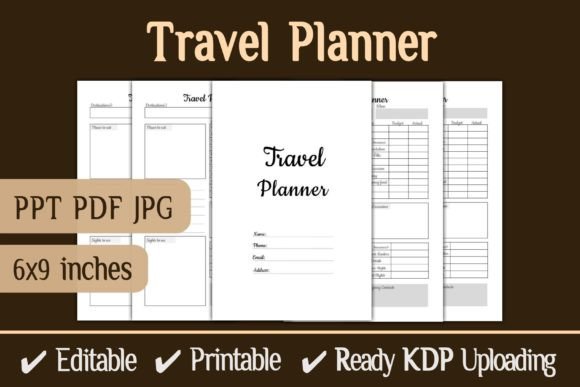
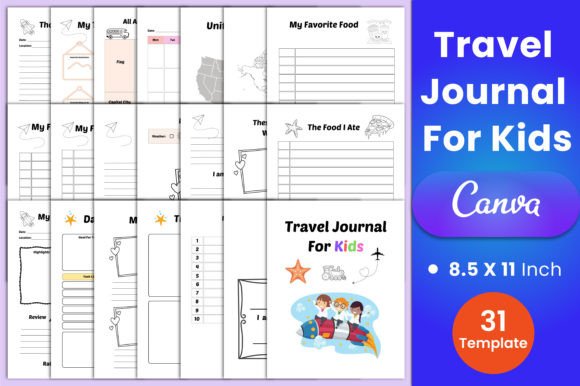
Unlike generic printable journals, this set is built for customization. It includes 31 pages sized at 8.5×11 inches with no bleed and 300 DPI resolution, ensuring crisp prints at home or through a professional service. You receive editable Canva files, high-quality PDFs, JPEGs, and PNGs, so you can choose the format that works best for your project. The pages cover everything from pre-trip planning to post-travel reflection, making it a complete solution for capturing memories.
Key Pages and Sections
The journal includes dedicated spreads for Belongs to pages, Thoughts of the day, My Travel Memories, and All About Country I Visited. There’s a Travel Plan and daily pages labeled Day …, plus maps like the United States Map and World Map for geography fun. Kids can document their Favorite Food, Favorite Place, and Favorite Thing, along with prompts like I am going to Travel and I’m On Vacation. The emotional check-in I am Feeling… helps children express their mood during the trip.
Other sections focus on the places they stayed (These Are The Pictures Where We Stayed), the food they ate (The Food I Ate), and My Favorite Moments. A My Vacation Journal and Daily Planner keep things organized, while My Photos and Travel Activity pages encourage creative documentation. For bigger trips, there’s a Vacation Planner, Travel Trip Budget, and a My Top 10 Places I Wish To Visit list. Every page includes a Trip No field, and the Travel Bucket List and Travel Memories pages round out the experience. The Note files give extra space for personal reflections.
Practical Applications for Different Audiences
This editable travel journal isn’t just for family vacations. It serves multiple use cases across personal, professional, and educational settings.
For Parents and Caregivers
If you’re planning a road trip or flight, printing a few journal pages before you leave gives kids a structured activity. The Daily Planner helps them anticipate the day’s events, while My Favorite Moments encourages them to record highlights. After the trip, flipping through the completed journal becomes a cherished keepsake. You can edit the text in Canva to match your child’s age—simplify prompts for a preschooler or add more writing space for an older child.
For Educators and Homeschoolers
Teachers can use the All About Country I Visited page for social studies projects. Pair it with the world map to teach geography. The Travel Trip Budget page becomes a math exercise, and My Favorite Food can spark a cultural food study. Because the template is editable, you can replace specific country names or add custom questions. The Travel Activity page works well for field trips, letting students document what they learned.
For Small Business Owners and Creators
If you sell printables or activity books, this template gives you a professional starting point. Edit the colors, fonts, and layout in Canva to match your brand, then export as PDF or PNG. You can resell the printed journals or use them as lead magnets. The high-quality 300 DPI files ensure your products look polished. The Travel Bucket List and My Top 10 Places pages are especially popular for travel-themed bundles.
For Bloggers and Content Creators
Travel bloggers can offer this journal as a freebie to grow their email list. Customize it with your logo and a personal welcome note. The My Vacation Journal page can include prompts related to your destination guides. Because the files come in multiple formats, you can share a preview as JPEGs on social media and provide the full editable PDF to subscribers.
Benefits of Using an Editable Canva Template
Choosing an editable template over a fixed PDF gives you flexibility. You can add your child’s name, change the date, or adjust the prompts. The free Canva account is all you need—no design software required. The 8.5×11 inch size is standard for printers, and the no-bleed margin means you won’t lose content when cutting. The 300 DPI setting guarantees sharp text and images, whether you print at home or via a commercial service.
Another advantage is the inclusion of multiple file formats. The PDF is ready for immediate printing, the JPEG and PNG files are great for digital use (like on a tablet with a stylus), and the editable Canva link lets you make changes anytime. This versatility is especially helpful if you plan to reuse the journal for multiple trips or for different children.
Real-World Examples and Recommendations
I’ve seen this journal used effectively for a two-week European family trip. The parents printed the Daily Planner each morning, and the child filled in the I am Feeling page during long museum visits. The Favorite Food page became a fun game—trying local dishes and rating them. After returning home, they compiled the My Travel Memories pages into a scrapbook using the photo pages.
For a classroom setting, a third-grade teacher used the World Map and All About Country I Visited pages during a unit on Brazil. Students researched the country and filled out the journal as if they had traveled there. The Travel Bucket List sparked discussions about goals and dreams. The teacher appreciated being able to edit the text to match her curriculum.
If you’re considering this template, start by opening the Canva link and reviewing all 31 pages. Decide which ones you’ll use and which you can skip. For younger children, you might only use the drawing-heavy pages like These Are The Pictures Where We Stayed and My Favorite Moments. For older kids, the Travel Trip Budget and Note pages add depth. Print a test page on plain paper to check alignment before using cardstock.
Practical Considerations
Because the template comes as a Canva file, you need a free Canva account. The editing is intuitive—simply click on text boxes and type your changes. You can also replace the placeholder images with actual photos of your trip. The My Photos page, for instance, has space for a picture and a caption. If you want to sell the final product, be sure to review Canva’s commercial use terms for its free elements; some require a Pro account for commercial licensing.
The journal is designed at 8.5×11 inches with no bleed, which is standard for US letter paper. If you plan to use a different paper size (like A4), you may need to adjust the scale when printing. The 300 DPI ensures high quality, but check your printer’s capabilities—most home printers max out at 1200 DPI, but 300 DPI is more than sufficient for sharp results.
Finally, consider the binding method. You can print the pages and three-hole punch them for a binder, or use a coil binding service for a more professional look. The pages are designed to be used individually, so you can also just staple them together for a simple booklet.
Final Thoughts
The Editable Travel Journal for Kids Canva template strikes a balance between structure and flexibility. It provides everything you need to document a trip without the hassle of starting from scratch. The 31 pages cover the full spectrum of travel journaling—planning, emotions, activities, memories, and dreams. Whether you’re a parent looking to enrich a family vacation, a teacher integrating travel themes into lessons, or a creator building a product line, this template saves time and delivers professional results.
Take advantage of the free Canva account to tweak the journal to your exact needs. Print a few pages for your next weekend getaway or use the full set for a cross-country adventure. The included PDF, JPEG, and PNG files make it easy to share digitally or in print. Give it a try and see how a simple journal can turn every trip into a lasting learning experience.